| benf.org : other : altstreamoverlay |
Update 09/2012 - People were asking for a 64 bit version - This is now in the binaries zip
Bugfixes - thanks to various folk for spotting! Details at bottom.
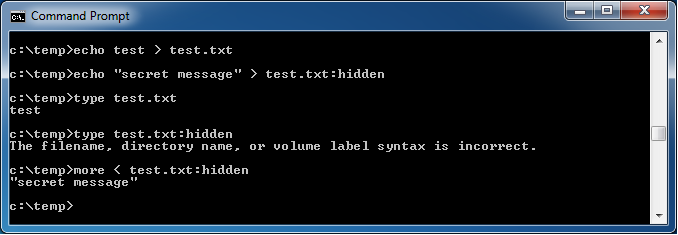
Note that on vista+, you can see the existance of these alternate streams with dir /r
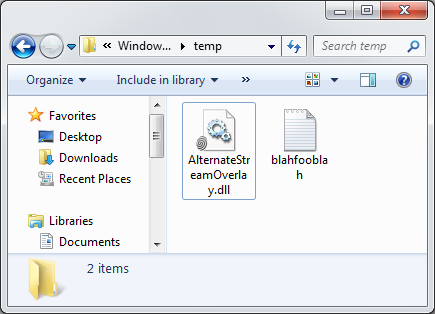
Looking at a directory with a file downloaded with internet explorer - note the superimposed fingerprint over the icon.
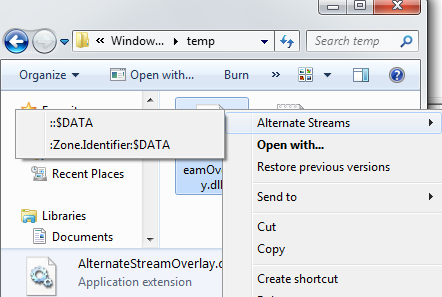
The context menu now shows (if applicable) a list of the alternate streams.
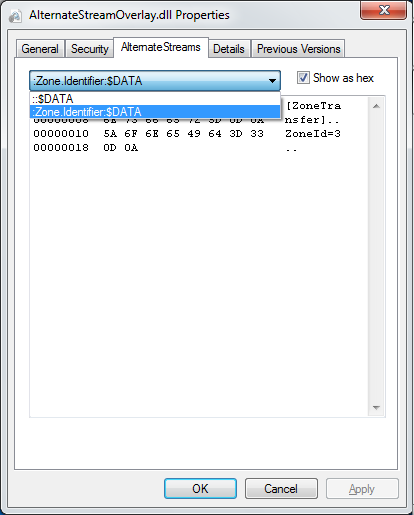
This file was downloaded using Internet Explorer - it's added an extra stream "Zone.Identifier" to supply metadata about where the file came from.
Note : If this fails to register, then you may not have the vc2008 runtimes. Get them here (x86) or here (x64)
Minor rev - 1.0.0.2 - Added 64 bit version
Minor rev - 1.0.0.3 - Display alternate streams for directories. (thanks rmeyr)
Minor rev - 1.0.0.4 - Correctly display when more than 64k of alternate data present. (thanks Peter Allgaier)
Minor rev - 1.0.0.5 - Was missing a file close. (thanks Peter Allgaier)
Minor rev - 1.0.0.6 - Re-added XP functionality - I'd switched to using a documented function, but that's only available in Vista+! n.b. now dynamically chooses to use 'official' or undocumented function, as the official one is threadsafe, so I don't have to perform external locking.(thanks Peter Allgaier - again!)
| Last updated 16/2013 |